Your launch monitor measures the ball.We measure you.
If you run a studio, you've already got the cameras, the PC and the launch monitor — so the outcome of every shot is no mystery. What's missing is what your body actually did to produce it, and whether you're really making the moves your coach asked for. That's the gap PinPoint Studio fills — and why it's named for the room it's built for.
Beta 6 — November 2026 Sixth beta out now · a session report coaches can send · still validating · 1.0 targeted late 2026
From the author of GoldenCheetah.
A typical sequence, drawn to scale: each segment peaks later and faster than the one below it, the club at impact. Time is stretched through the downswing, as these charts always are. The live chart plots your own swing.
Inside the studio.
A first look at the desktop app as it stands today — from setting up your kit, through replaying a swing beside its numbers, turning it round in 3-D and charting a whole session's swings together, reading those numbers against a codified diagnostic model and seeing what a whole session adds up to, to marking swings up by hand for validation.
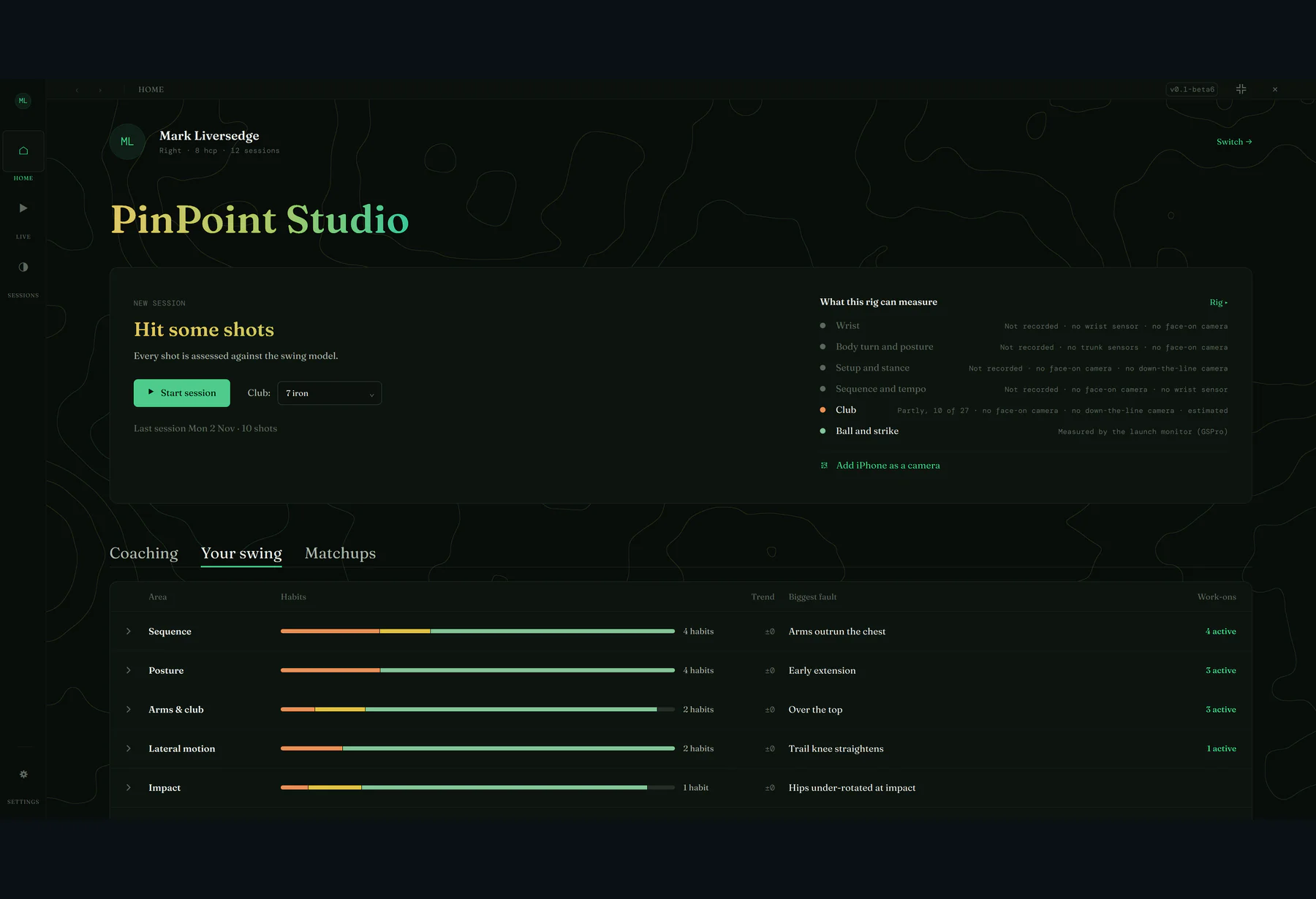
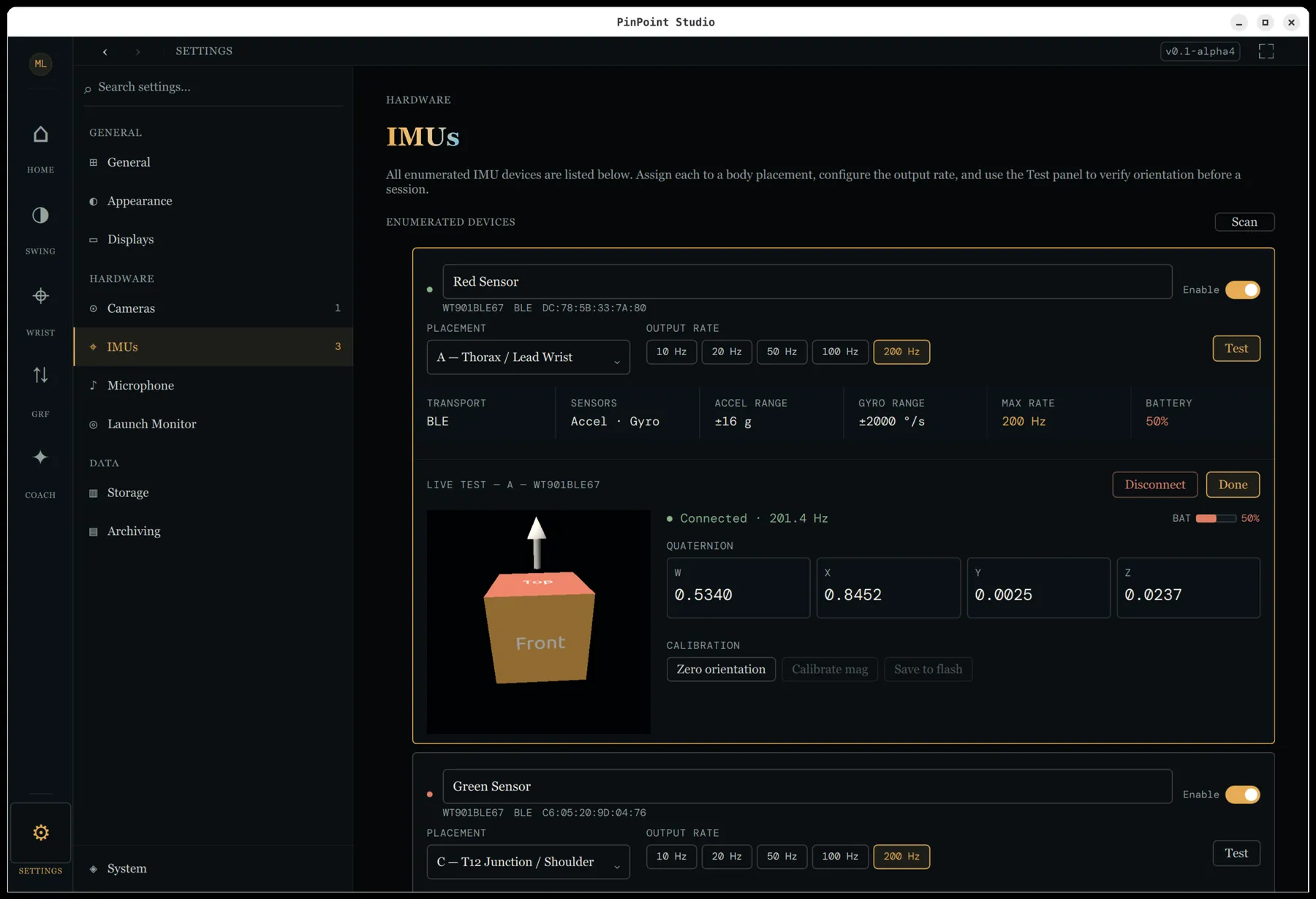
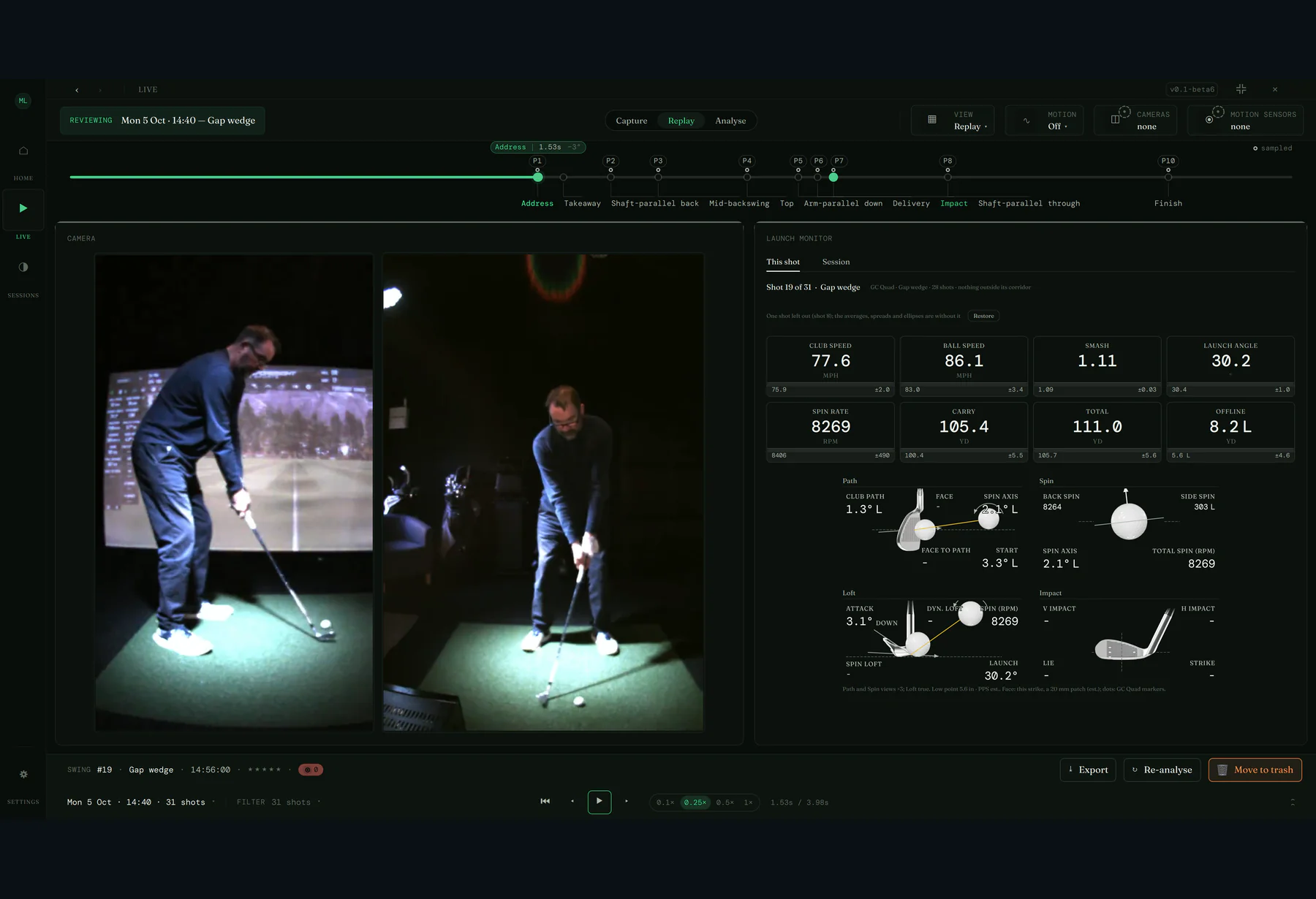
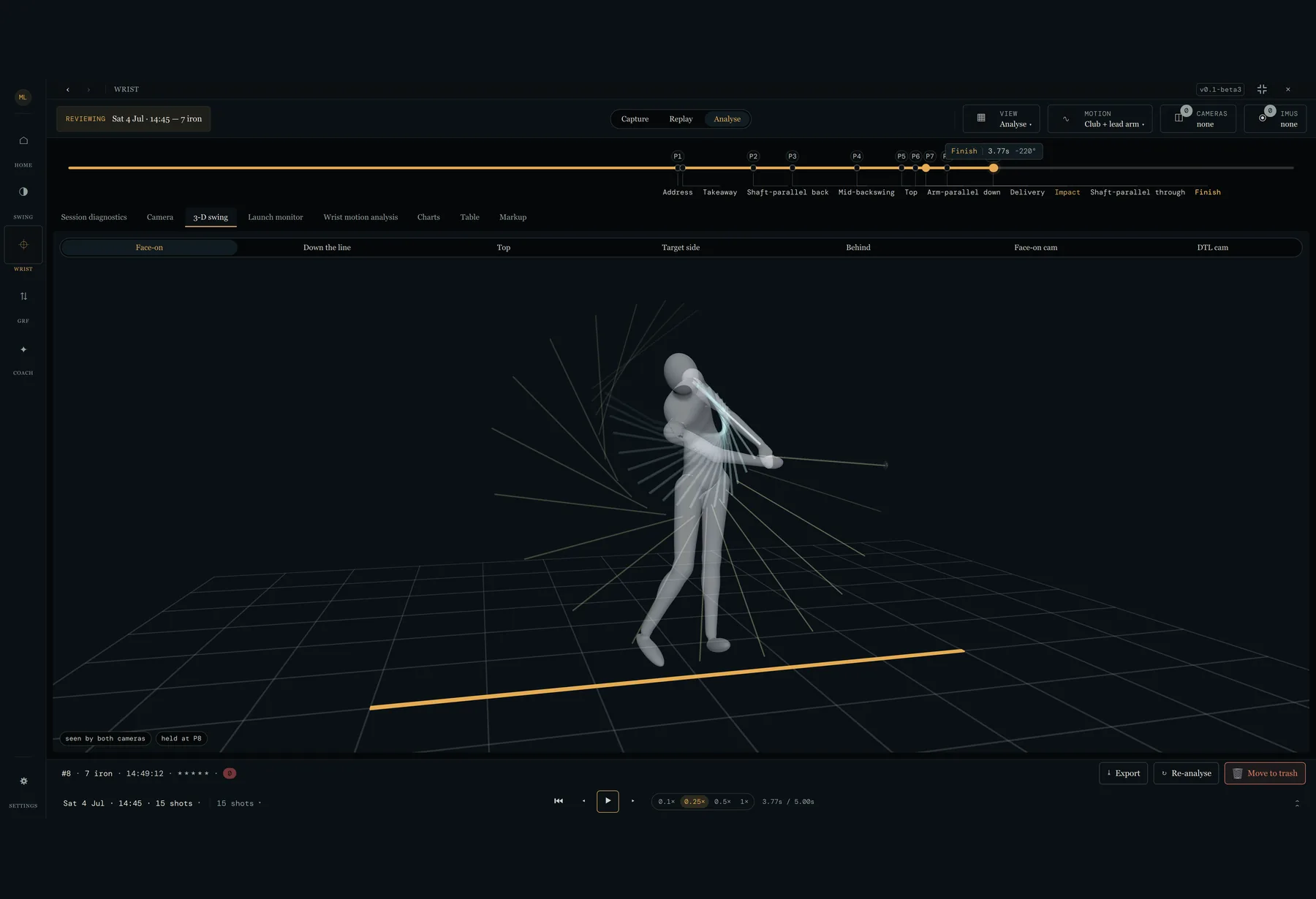
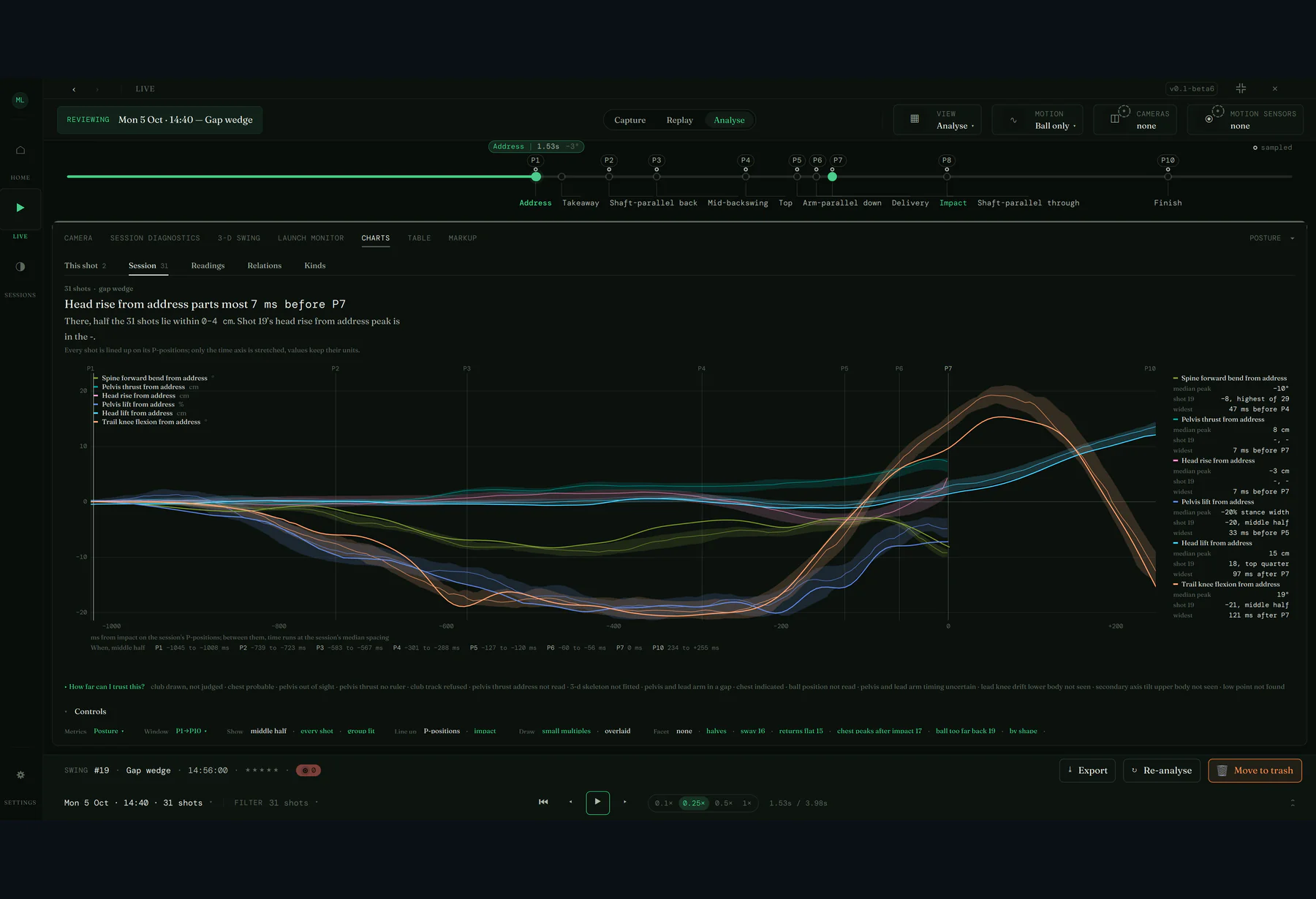
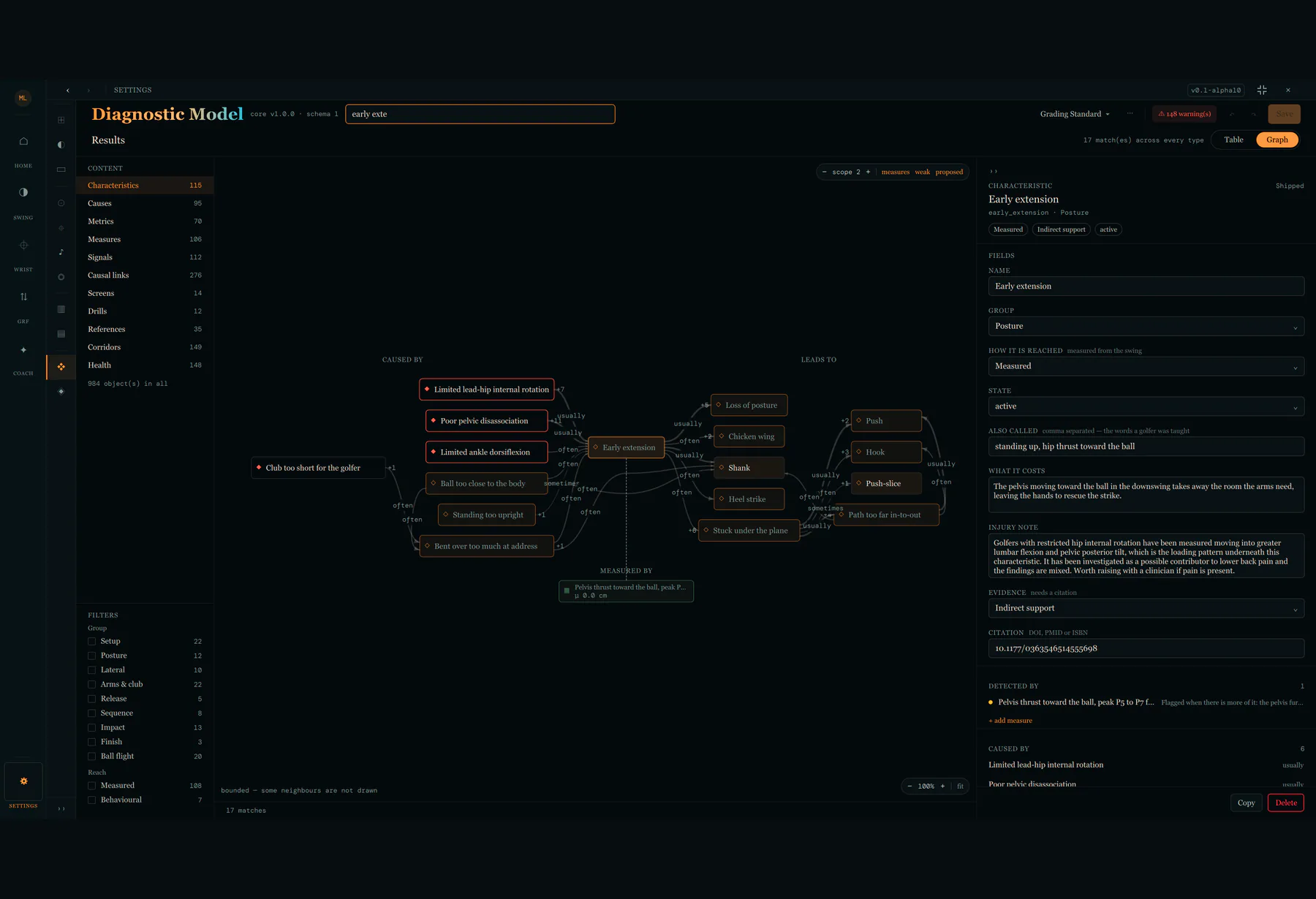
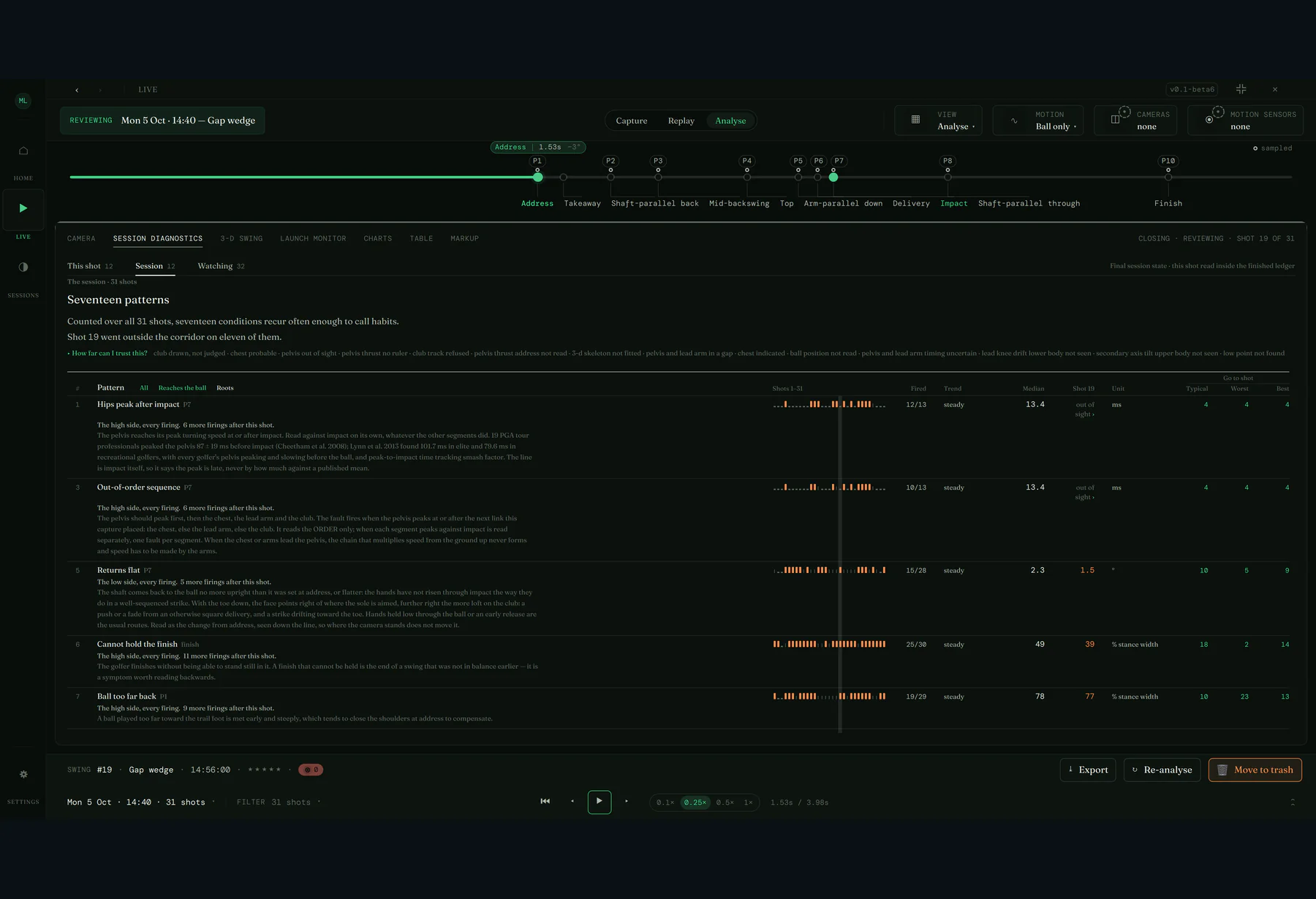
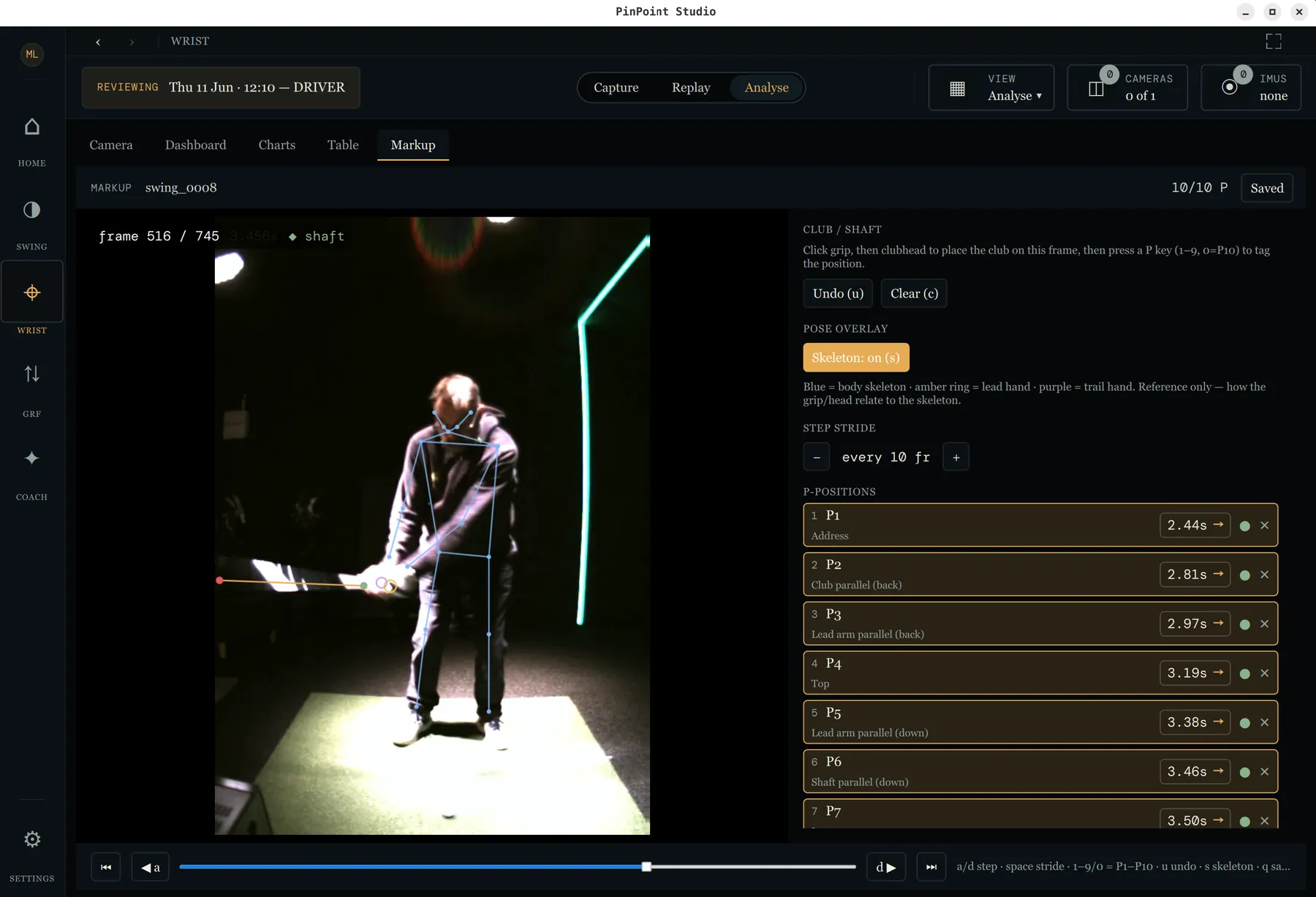
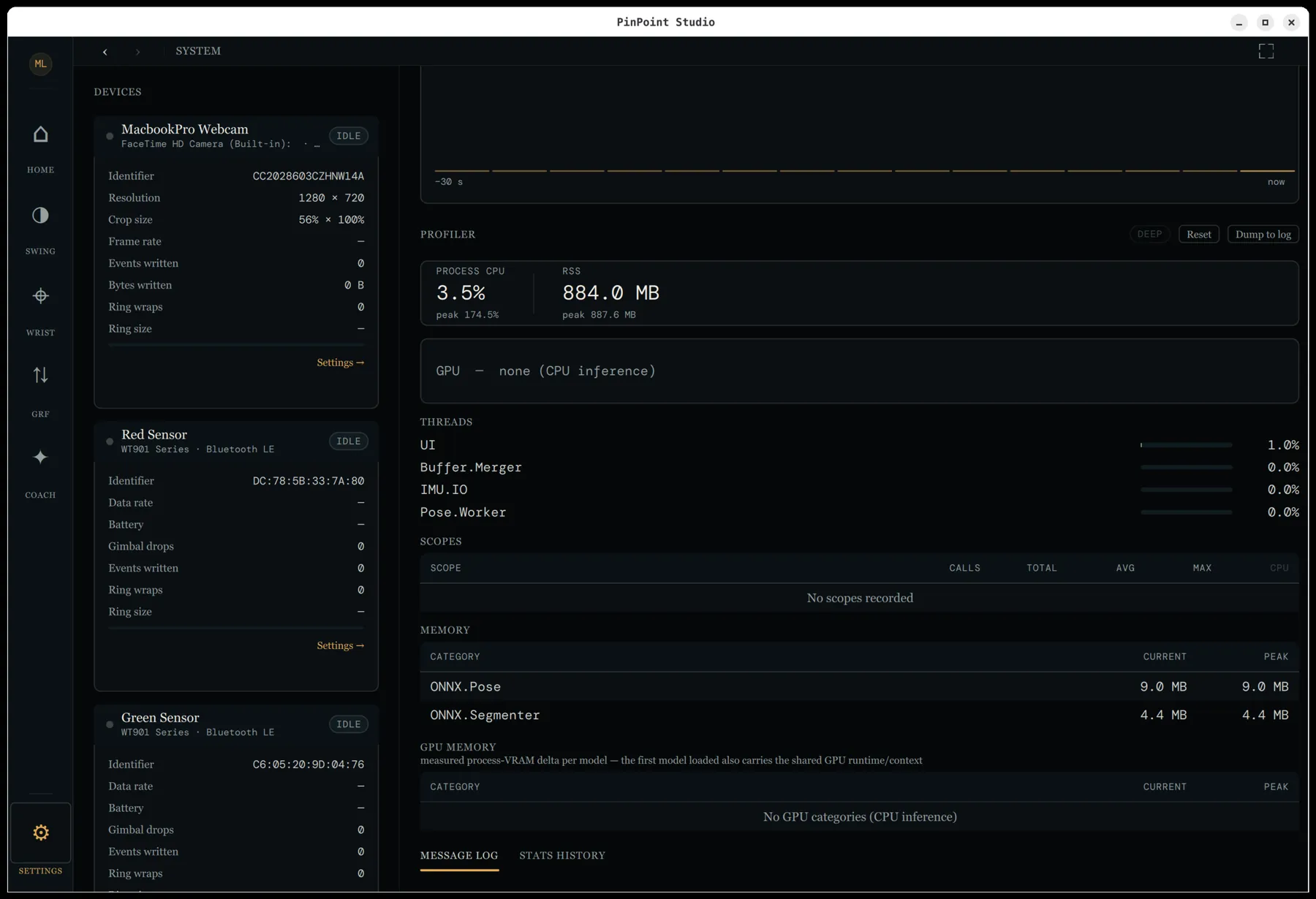
Screens from the current pre-release build — the interface is still evolving.
Peer-reviewed science, in your hands.
PinPoint Studio exists to put the measurements the research actually supports into the hands of coaches, players and enthusiasts — methods drawn from the published literature, kept open for anyone to check, and led by the science rather than private interests.
We won't publish until the numbers can be trusted.
PinPoint Studio is an early prototype under active validation. Every measurement is being checked against a hand-annotated corpus of real swings before it goes anywhere near a release — because results you can't rely on are no use to anyone. There's a beta to try if you want to follow along, but nothing to depend on yet — and there won't be until we're confident the figures hold up. That bar is deliberate, and getting the science right is the whole point.
Four deep dives into that science in practice — written in plain English, not academic jargon:
How it works (for the nerds)
The full tour of the machine — devices, calibration, capture, inference, fusion, segmentation, metrics and diagnosis, stage by stage.
Read the whole pipeline ↗The science behind the score
How a captured swing becomes an honest number — the movements we measure, and the maths that stops one number hiding a real fault.
Read how scoring works ↗From a session to what to work on
The diagnostic model in full, how evidence builds swing by swing into patterns and causes, how the work-on list is ordered — and what the app is entitled to call true.
Read how diagnosis works ↗Finding the shaft in the blur
How we track a thin shaft moving past 100 mph — leaning on the golfer's anatomy and swing physics rather than fighting the blur, and how a bare club becomes its own ruler.
Read how tracking works ↗How we earn the numbers.
Trustworthy measurement isn't a claim, it's a process. We're building a hand-annotated corpus of real swings and testing every algorithm against it — so a figure only ships once we can show it agrees with the ground truth.
A corpus of swings
A growing library of captured swings — multiple cameras, IMUs and players, recorded under real studio conditions. The dataset every measurement is held against, kept varied enough to show where a method breaks.
A markup tool to annotate
A purpose-built tool to mark up each swing by hand — swing events, key positions and joint motion — turning raw captures into labelled ground truth a person has actually checked.
SwingLab holds them to it
SwingLab, our validation harness, replays the exact production pipeline over the corpus and scores it against physics invariants and the hand-labelled truth — with byte-identical regression gates, so a change that shifts a single number can't slip through unnoticed. It holds the error bars to account as well: a ± only counts once real errors land inside it as often as it promises.
Ordinary kit, measured carefully.
PinPoint Studio reads the swing from hardware you can buy off the shelf — there's no sealed rig and no per-shot cloud round-trip. Five signals capture today — cameras, the phone in your pocket, wrist sensors of two kinds and, if you have one, your launch monitor; force estimation is on the way.
USB webcams or GenICam / FLIR industrial cameras — face-on and down-the-line. Every live feed carries an on-device pose skeleton. The down-the-line camera now pulls its weight: it tracks its own skeleton, shaft and ball, sees the posture face-on can't — forward bend, pelvis thrust, trail knee flex — and with face-on it puts the shaft in 3D, with no calibration. And one industrial camera can now take the impact view: cropped to a strip at the ball, a Chameleon3 runs at 591 fps on a 70 µs exposure, keeps just the frames around the strike, and loops them picture-in-picture beside the swing. With two cameras the body is now fitted in 3-D, standing on the floor with the club at its recorded length, and hip and chest turn, X-factor and stretch are read from it with no sensors worn. The down-the-line view also reads shaft lie and over the top from the hand path. Session setup has a Framing step that shows each camera live with the pose on and checks there's headroom at the top of the swing, and a swing whose video starts too late to see the strike is held back rather than analysed. The cameras you choose, not a locked box.
An iPhone running PinPoint Capture is a camera in the session, not a file you import afterwards — paired by scanning a QR code off the Studio screen, armed by the session's own Capture button, recording at 120–240 fps and delivering the clip to the swing library over WiFi or a cable. High-speed capture without high-speed cameras.
Off-the-shelf BLE IMUs (Witmotion WT901BLE67) at up to 200 Hz capture the wrist flexion, deviation and rotation a camera can't see cleanly — fused into joint angles on-device. Now they go on the hips and chest too: worn on the back, calibrated hands-free in session setup with spoken golf-term cues, and fed straight into the kinematic sequence.
The HackMotion wG3 is supported as the criterion instrument for the wrist — its own calibration ceremony, a check-sensors page that speaks the device's reference frame, and forearm rotation reported under the vendor's own name. Angles are published in ISB convention, and its readings sit beside our strap-on IMU estimates rather than in place of them.
Studio plays the GSPro Connect server, so any monitor with an Open Connect bridge — a Garmin R10, Rapsodo MLM2PRO, SkyTrak+, PiTrac — connects straight to it; a Foresight GCQuad is read the other way, from the files FSX2020 writes — and, from the build after beta 6, Foresight Premier too, following the club selected there. Either route, the readings are treated as a reference instrument: ball speed, spin, face and path recorded beside our own estimates, never replacing them. The Open Connect link is new, and so far proven against a simulator built from sixteen real clients rather than a device on a mat.
Ground reaction force, estimated from motion, so you can see how the swing loads, shifts and unloads through the strike. The science here is still young, so it's one we'll follow the research on rather than rush.
Your phone is a camera.
High-speed cameras are the biggest cost barrier to swing analysis — and most golfers already carry a device that shoots 1080p at 240 fps. PinPoint Capture, our iPhone companion app, makes that phone a first-class capture source: not a clip you film and import afterwards, but a device the session drives.
Pair it once
Press Pair to my phone and Studio puts a QR code on screen; scan it with the phone and you're paired. Scan again to add another — a down-the-line and a face-on — and a paired phone is remembered, on Windows and Linux as well as macOS.
It behaves like a camera
A paired phone appears in the device list beside every other camera, with its own live preview. The session's Capture button arms it along with the rest, and each phone reports its battery, its thermal state, whether it's on WiFi or a cable, and how well its clock agrees with Studio's — agreement now converges in 1–8 seconds.
The swing comes back
The clip the phone recorded is asked for, transferred over WiFi or a USB cable, and filed against the swing it belongs to in the library — replaying at the file's own frame rate, for as long as it actually is.
iPhone, while we build it
NowDuring initial development PinPoint Capture targets the iPhone — iOS 18 or later, on a phone that records 1080p at 120 fps or better. Its first screen checks the camera and tells you plainly whether it's good for capture. Development and hardware testing run on an iPhone 16. It goes to the App Store with the first release, at the end of 2026; until then it builds from source with Xcode.
Android, in time — not soon
LaterAndroid is coming, but it won't be quick. Its high-speed camera hands frames over in batches rather than one at a time, its camera and microphone don't always share a clock, and rolling-shutter timing has to be profiled model by model — each of which matters when the point is a millisecond you can trust. So the app is built for the port from day one: the core logic holds no iPhone code, device timing is data rather than code, and the protocol is the same on both. That makes Android a port rather than a rewrite — but it is still a port.
It talks to Studio over PPCP, the PinPoint Capture Protocol — an open specification with an MIT-licensed reference implementation, so any device can implement it and any host can read it. The spec and the library are public alongside the app, and the app's own source is MIT-licensed too.
Four ways to see a swing.
There are no session modes to pick between any more: a session simply records whatever the rig in the bay can see, and can carry a focus. Swing analysis and wrist motion both produce real output today — under validation, not yet released; ground force and the AI coach follow on the same capture pipeline.
Swing Analysis
Full-body kinematics from the captured frames — a 133-keypoint whole-body pose, shaft, club-head and ball tracking, and 95 swing metrics extracted today from a 133-metric catalogue: X-factor, club-head speed, lag, hip and shoulder rotation, tempo, posture at every position and the swing plane — the shaft, hand and shoulder planes fitted across the golfer's day — and more. Swing timing now speaks in P-positions: P1–P8 and P10 are resolved from the club track itself, arbitrated on what a reading is rather than which producer got there first. The whole-swing score is the piece still being built.
Wrist Motion
Lead-arm flexion/extension, radial/ulnar deviation and rotation read straight from the sensors, segmented across the swing and scored against coaching bands — the cupping, cocking and flipping a coach watches for. Works from our strap-on IMUs or from a HackMotion wG3, whose readings are kept beside ours rather than replacing them. No longer a separate mode: the wrist sits in every shot and session it was recorded in, and gets its own page in the session report. The first full analyzer; its results are in validation now, not yet released.
Ground Force
Loading, weight shift and ground reaction force through the downswing — where the power comes from, not just where it ends up. The approach is scoped and the research reviewed, but it's gated on force-plate ground truth we don't yet have — so we'll let the science lead rather than rush. Realistically, something meaningful here is a late-2027 job.
AI Coach
Ask about your swing out loud and get answers spoken back — all on-device. The local language model (Phi-4-mini), speech in and out, and the conversation loop are already built and running; grounding it in your own session findings is the work in progress.
From numbers to a diagnosis.
Measurements alone don't coach. PinPoint Studio codifies the swing-fault literature into a causal model, then reads every session against it — so a number out of range becomes a named fault, a likely cause and a drill to work on.
186 swing conditions linked by 639 causal edges, 208 measures, 170 detection signals and 271 reference corridors, plus 17 physical screens and 45 drills — drawn from a 49-source bibliography, every claim carrying its provenance. The kinematic sequence, posture at every position and the swing plane are all part of it. Browsable and editable inside the app, causal graph and all — down to the words the session report prints.
A shot fires findings; only a session diagnoses. Evidence accumulates shot by shot into a session ledger, patterns that recur are held to honest statistics — within a club, and counting only the shots that could actually be assessed — and causes are ranked along the model's authored chains. Because it is cumulative by construction, the ledger is the session summary at close: a finished session can be reviewed shot by shot in its own right without rewinding the live one, and the live panel casts to a second screen for the athlete. The panel reads as three tabs, This shot, Session and Watching; This shot follows the swing you pick. Across sessions it adds up on the home screen: Coaching gives one focus to practise in plain words, Your swing counts the habits in each area of the swing with any fault opening in place, and Matchups shows the faults that travel together. A work-on clears only when a later session measured it and found it quiet.
Every verdict carries its receipt — the measurement behind it and the corridor it broke — and a finding with no number behind it says so rather than passing as fact. A reading outside its corridor says so, and never claims it is fine; where something can't be read, the panel says exactly why. The error bars on the readings reach the verdicts too: each finding carries the probability that it really fired, and the likely driver says how firm it is and whether it was measured or only inferred. Every shot and session answers How far can I trust this?, a refused reading names the check that refused it, and the diagnostic model lists every check and how often it fires. Today's corridors are literature-seeded; re-seating them from measured swings is what the validation corpus is for.
A coach turns a session into a branded PDF — posture, wrist and club delivery pages, and a launch monitor appendix with every shot and the session's figures with their spread — and sends it to the player straight from their own mail account, or hands it to their mail app. What the report can't check, it says, in the model's own words.
Where it is, and where it's going.
PinPoint Studio reached its sixth beta on 1 November 2026: Home is rebuilt around one screen per job with no session modes to choose, coaches can send a branded session report, the hip and chest sensors join the kinematic sequence, and every refused reading says which check refused it and why. Capture — cameras, phones, wrist sensors and a launch monitor — full-swing metric extraction, the kinematic sequence, the diagnostic model and session diagnostics are all working, and the down-the-line camera now counts; the whole-swing score, ball flight and club data from the impact camera come next. It is still a beta, and we're still proving the numbers.
Working
- Multi-camera capture with live on-device pose overlay
- Down-the-line camera with its own tracking — posture face-on can't see, and the shaft in 3D where the two views' shaft planes cross
- Impact camera — an industrial camera cropped to a strip at the ball at 591 fps, the frames around the strike looped picture-in-picture
- iPhone as a capture camera via the PinPoint Capture companion app, over WiFi or USB
- Post-shot analysis — 133-keypoint whole-body pose, shaft, club-head & ball tracking, its stages run in parallel so a studio re-analysis takes about 8 seconds, down from 19
- Markerless club tracking — a bare steel shaft read as its own ruler, so irons need no tape (graphite woods & hybrids still do)
- Error bars on the club numbers — every shaft reading and metric carries a ± calibrated against 996 hand-marked frames, says whether it was checked or only propagated, and flags a reading that may be on the wrong thing; a club track the evidence contradicts is refused, with its reason
- 95 swing metrics extracted today — X-factor, club-head speed, lag, rotation, tempo, the kinematic sequence link by link, and from down the line shaft lie, over the top and posture off the outline of the body
- Posture at every position, P1–P8, against good players by pattern — including loss of posture and poor posture at address
- Club delivery — the swing plane graded as an absolute angle back and down, with the hand plane and the shoulder plane at address, fitted across the golfer's day
- Kinematic sequence chart — pelvis, chest, lead arm and club speeds from IMUs on the arm, hips and chest, one camera or two, read through to P8, with a tile setting the order they peaked in beside the order they should, each peak as a percentage of a professional's
- Calibrated two-camera 3D body — a jointed skeleton standing on the floor, with hip and chest turn and X-factor read from it without IMUs
- 3-D swing view — rotate, zoom, track and trace the swing from any angle, or snap to either camera's view; now a panel on the Wrist screen too
- Coach lines placed automatically — head circle, hip lines, the rear line and the address plane — and a synthetic club on replay
- P-position timeline — P1–P8 and P10 resolved from the club track
- Live lead-arm wrist analysis, scored against coaching bands
- HackMotion wG3 wrist sensor as the criterion instrument, published in ISB convention
- Diagnostic model — 186 conditions, 639 causal edges, 271 norms — editable in-app, down to the report's words
- “How far can I trust this?” on every shot and session — a refused reading names the check that refused it, everywhere it appears
- Session diagnostics — a cumulative evidence ledger, ranked causes, cast to a second display; This shot, Session and Watching tabs, each finding carrying the probability it really fired
- Home rebuilt — a Start card, what the rig can capture, and Coaching, Your swing and Matchups tabs; one focus in plain words, faults opening in place, a work-on cleared only when a later session measured it quiet
- Session report — a branded PDF with posture, wrist and club delivery pages and a launch monitor appendix, sent from the coach's own mail account
- Session setup — one flow for every session, its steps taken from the hardware connected, with a Framing check and hands-free hip and chest sensor calibration
- Sessions table — filters, multi-select and bulk actions, and the devices each session was recorded with
- Session review — a finished session read back shot by shot, without rewinding the live one
- Launch monitors — GSPro Open Connect (R10, MLM2PRO, SkyTrak+, PiTrac…) and the Foresight GCQuad through FSX2020, with Foresight Premier in the build after beta 6 — measured values beside our estimates
- Shot detection — manual, IMU-impact and acoustic — with per-shot capture, replay & export
- Swing files as .ppsw — a documented binary format, lossless and about a tenth the size, with MIT C++ and Python readers
- Archiving — finished sessions out of the library and back, verified byte for byte, with the hours of capture you have left
- Swing corpus, in-app markup tool & the SwingLab validation harness
- Local speech in & out (Whisper + Kokoro) and a local coaching LLM (Phi-4-mini)
In development
- Whole-swing 0–100 score — the scorer & uncertainty maths are built; full-swing bands being seated
- P9 — the one rung of the P1–P10 ladder still deferred
- Club data from the impact camera — club speed, ball speed, angle of attack & low point, read at the ball, once the calibration card arrives
- Ball-flight tracking — ball speed, launch angle & direction
- Corpus v1 — re-seating the literature-seeded norms from measured swings
- AI coach grounded in your session findings (chat, voice & local LLM already built)
- Offline catch-up for the capture companion when the phone loses the host
On the roadmap
- Ground reaction force — gated on force-plate ground truth (likely late 2027)
- Launch monitors that don't speak Open Connect (Uneekor, Bushnell) and more wrist sensors, on the same beside-not-instead-of contract
- PinPoint Capture on Android — designed for from the start, but a real port, and not a quick one
Built like an instrument.
Made for the people in the bay.
Teaching pros
Objective numbers to set beside what you already see — an evidence layer for a lesson, on hardware that fits a studio bay or a garage.
Serious amateurs
The wrist and sequencing measurements you've read about for tour players, applied to your own swing and the kit you choose.
Coaches & researchers
An open, inspectable platform for understanding golf movement — every metric traceable to the source, the source in the open.
You install it, you use it. That's the whole deal.
There is no registration, no account, no licence key and no trial. We don't ask for your name, your email or your club. There's no mailing list to join and no third-party processor in the loop — nothing to unsubscribe from, because there's nothing to subscribe to. It's free as in freedom and free as in beer, it is open source, and it will stay that way. Download the build, run it, and your swings stay on your own machine.
No account, no key, no activation, no “request access”. Download it and it runs.
Free as in freedom and free as in beer. GPL v2, source in the open — no paid tier, no pro edition, no upsell.
No mailing list, no analytics, no tracking, no third-party processors. We hold no details about you because we never collect any.
Swings, video and sessions are files on your own machine, in a documented format any tool can open — archived to a folder you choose, or moved off entirely, whenever you like. Local by default — nothing goes to a cloud unless you set one up yourself.
Open in every way. PinPoint Studio itself is GPL v2. And when we write something another project could use, we don't leave it buried inside the app — we package it up as a standalone, MIT-licensed library, specifically so others can benefit from it. Talking to a HackMotion wrist sensor became libwrist; speaking GSPro Open Connect to a launch monitor became libgspro; reading and writing a recorded swing became libppswing; the phone protocol is a published spec. We will always be open source, and we will always back the organisations and standards that are open too.
It's in beta — and it's yours.
PinPoint Studio reached its sixth beta on 1 November 2026, with a 1.0 targeted for late in the year — once we're confident the measurements can be relied upon. There's no form to fill in and no list to join: take the build, run it, keep it. It's GPL v2 and built in the open — for golfers, coaches and researchers alike. Watch the repo if you want to hear when something lands, and bring questions to the issue tracker.